Apna Khata
In today's digital age, the Rajasthan government has made it incredibly simple for landowners and farmers to access their property details from the comfort of their homes. The Apna Khata portal (also known as e-Dharti) serves as the official land records management system of Rajasthan.
Whether you need to check your land ownership or apply for a name transfer, this guide will walk you through everything you need to know.
What is Apna Khata Rajasthan?
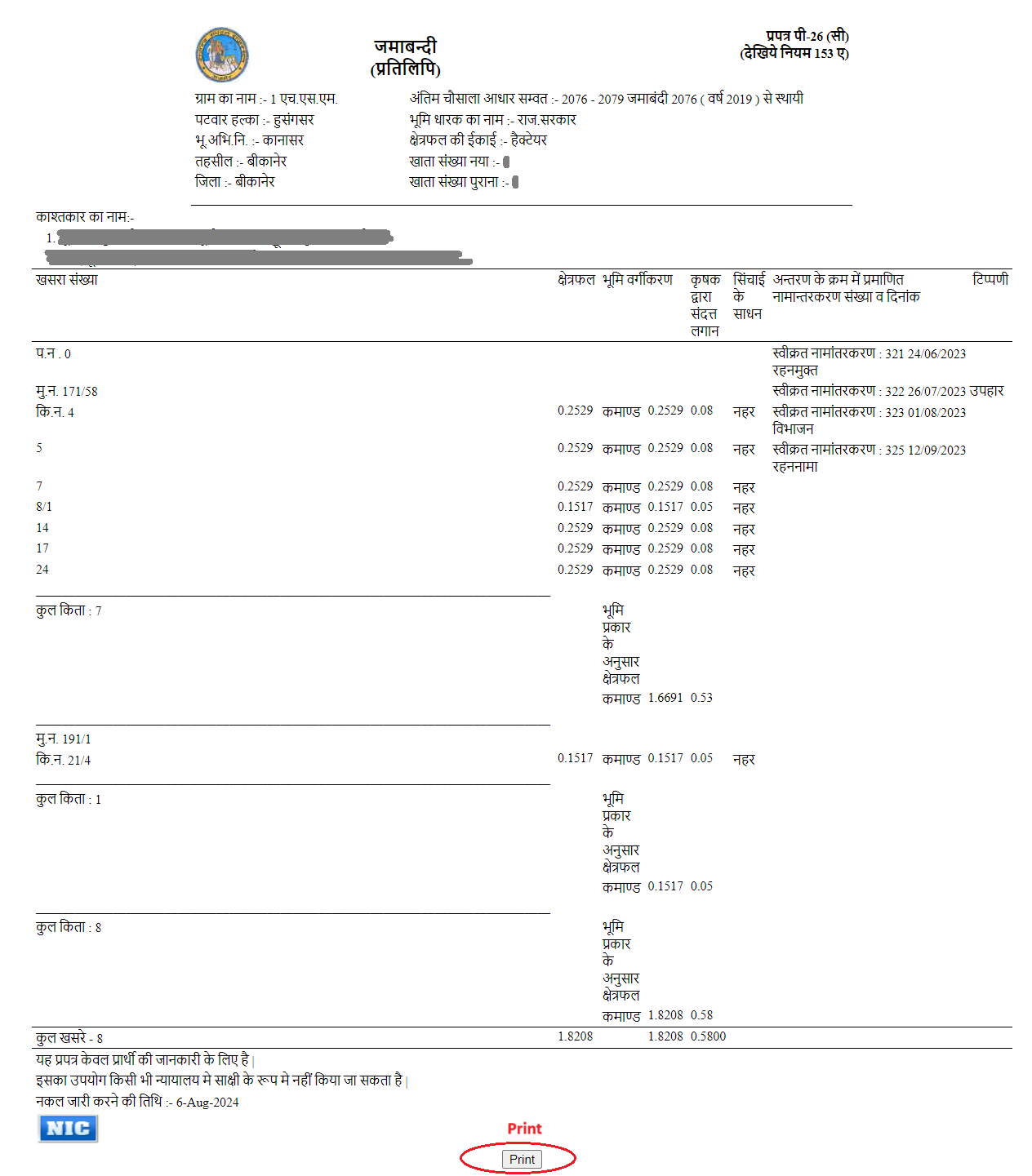
Apna Khata is an online initiative by the Revenue Department of Rajasthan to digitize land records. Think of it as a "digital locker" for your land documents. Instead of making multiple trips to the Tehsil office and waiting in long queues, you can now access "Jamabandi" (Record of Rights) and other documents with just a few clicks.
| Feature | Detail |
|---|---|
| Portal Name | Apna Khata (also known as e-Dharti) |
| State | Rajasthan |
| Department | Revenue Department of Rajasthan (Board of Revenue) |
| Purpose | To digitize land records, increase transparency, and prevent land fraud. |
| Official Site | apnakhata.rajasthan.gov.in |
Services available on Apna Khata
The portal offers a variety of services for farmers, buyers, and landowners:
- Jamabandi Nakal (Record of Rights): The most popular service. It allows you to view and download your land ownership records.
- Mutation (Namaantar) Application: You can apply for a name transfer online if you have bought land, inherited property, or received it as a gift.
- Mutation Status Tracking: Track whether your name transfer request is pending, approved, or rejected.
- Bhunaksha (Land Maps): View and download digitized maps of your plot to see exact boundaries.
- Girdawari Records: Check the details of crops grown on a particular piece of land during a specific season.
- Revenue Court Status: Check the status of ongoing legal cases related to your land.
- E-Signed Documents: For a small fee, you can download "Authorized Copies" that are legally valid for bank loans and court use.
Features of Apna Khata Rajasthan
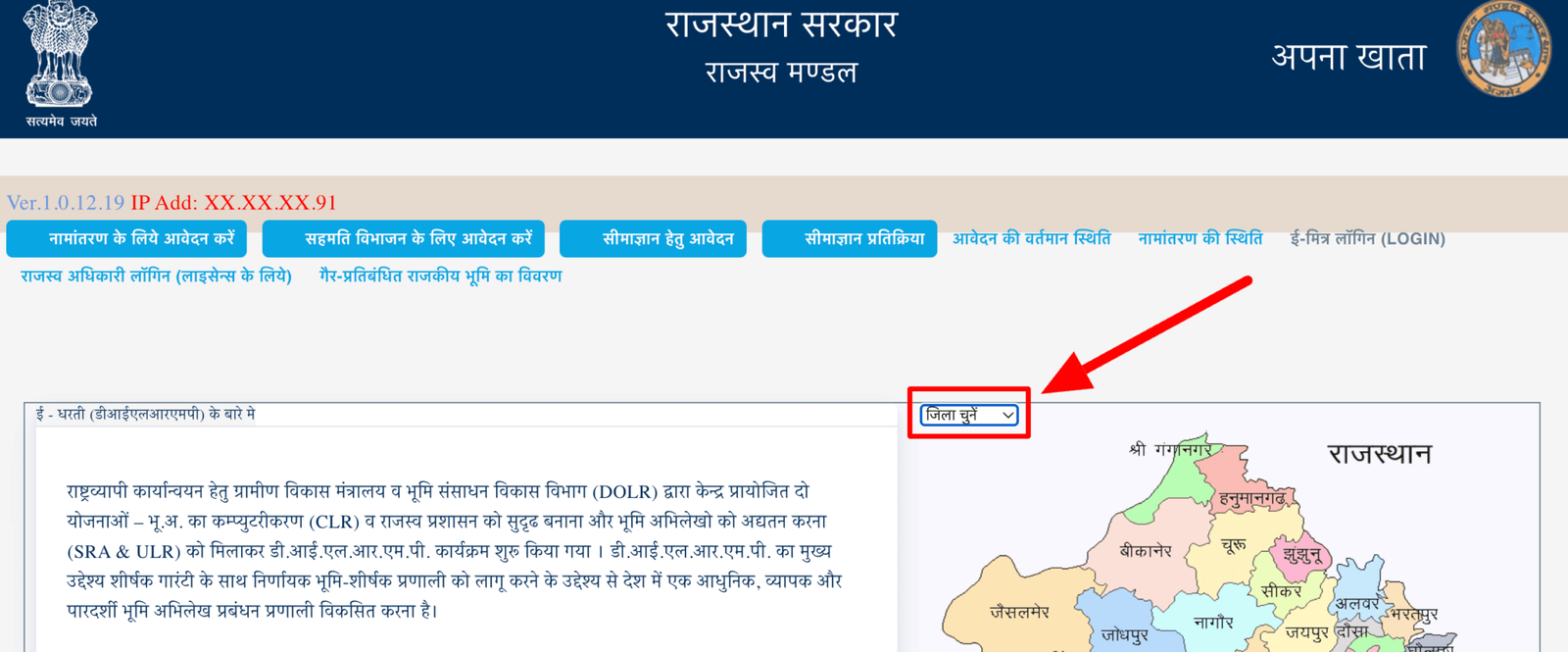
- Map-Based Interface: The portal features an interactive map of Rajasthan. Users can simply click on their district to dive deeper into tehsil and village records, making it intuitive even for those not tech-savvy.
-
Multiple Search Options:
You don't need all your papers to find your land. You can search records using:
- Khata Number (Owner's account number)
- Khasra Number (Specific plot number)
- Name (Owner's name in Hindi)
- USN/GRN (Unique identifiers)
-
Dual Document Types:
- Copy for Information (Soochnarth): Free to view and download for personal reference.
- E-Signed Copy: Legally valid documents with digital signatures for formal use (bank loans, court cases), available for a nominal fee.
- Real-Time Mutation Tracking: One of the most powerful features is the ability to track "Namaantar" (mutation) applications. You can see if your file is with the Patwari, Tehsildar, or approved, ensuring accountability.
- Mobile Accessibility: The portal is optimized for mobile browsers and has a dedicated Android application, allowing farmers to check records directly from their fields.
- Historical Records: While the portal focuses on current records, users can access digital records dating back several years (typically up to 1920) to check land history.
- Grievance Redressal: A built-in system to report errors in Land Records or delays in mutation processing directly to the revenue department.
- Integration with Bhunaksha: It works in tandem with the Bhu Naksha portal, allowing you to cross-verify the written record (Jamabandi) with the physical map of the plot.
Steps to Check Land Records (Jamabandi)
To view your land details, follow these simple steps:
- Visit the Portal: Go to the official website: apnakhata.rajasthan.gov.in.
- Select District: On the homepage map, click on your District.
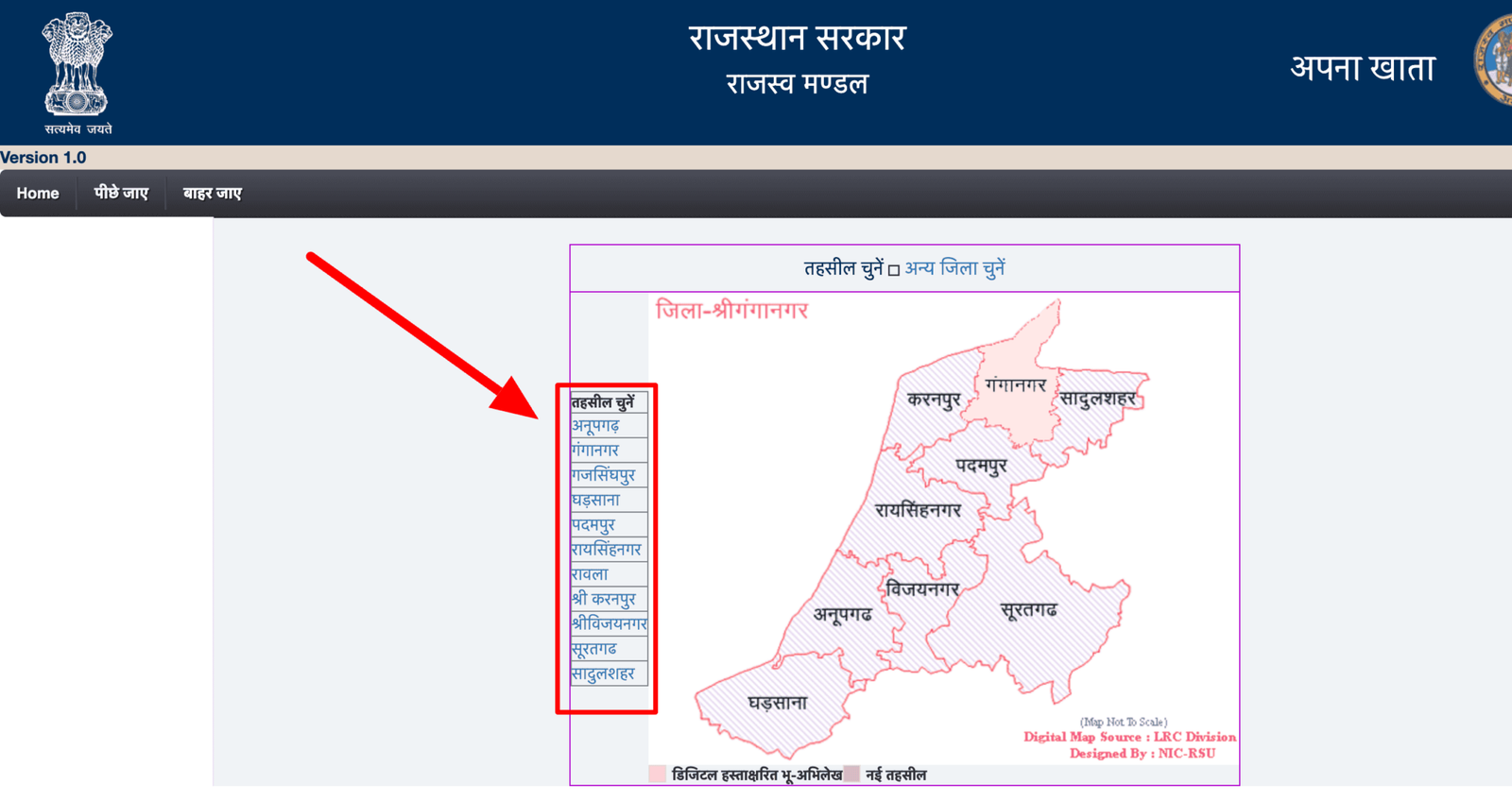
- Choose Tehsil: A list of Tehsils will appear; select the one where your land is located.
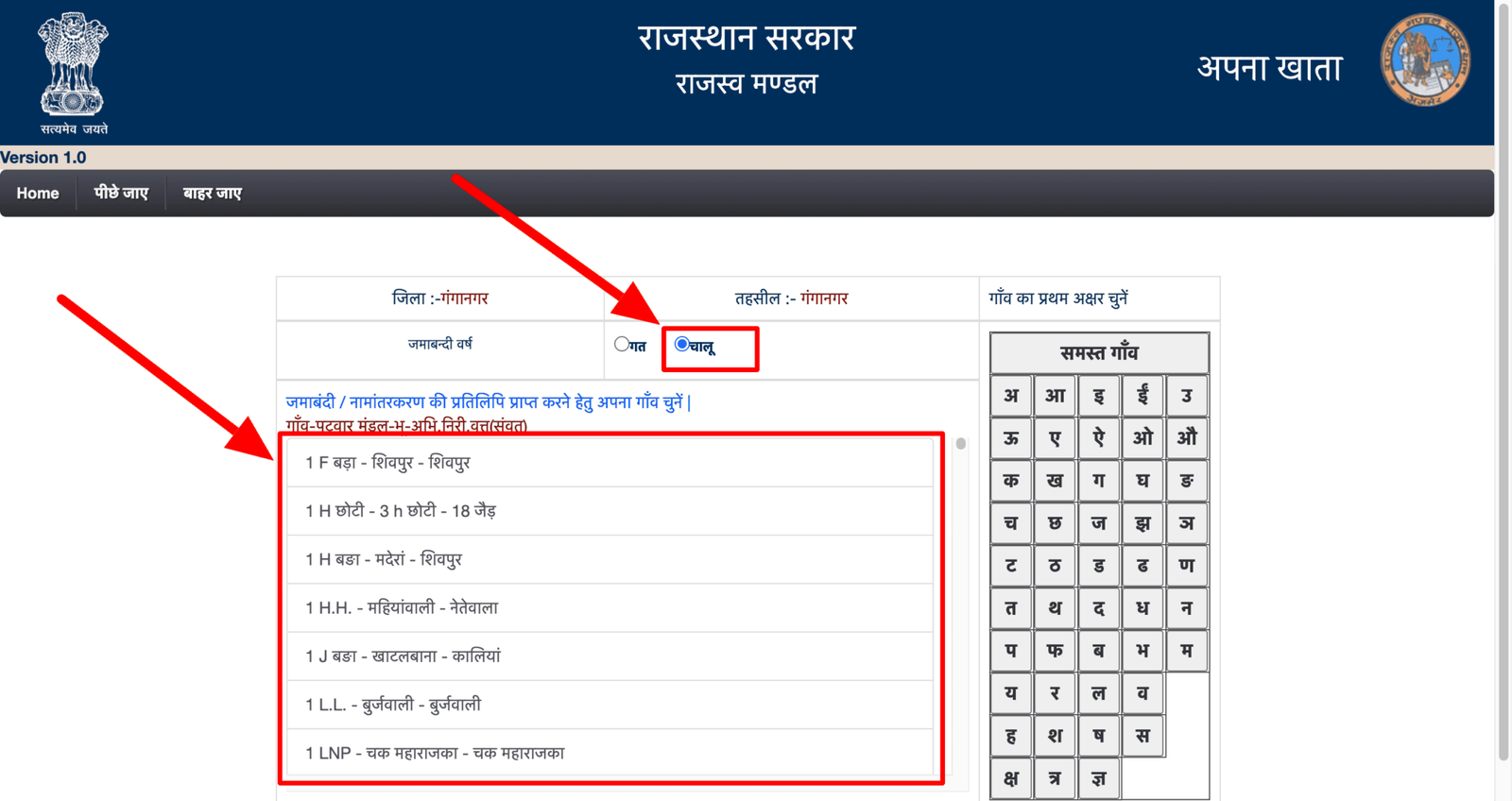
- Find Your Village: Pick your village from the alphabetical list.
-
Enter Details: You can search for your record using:
- Khata Number (Account Number)
- Khasra Number (Plot Number)
- Name (Search by owner's name)
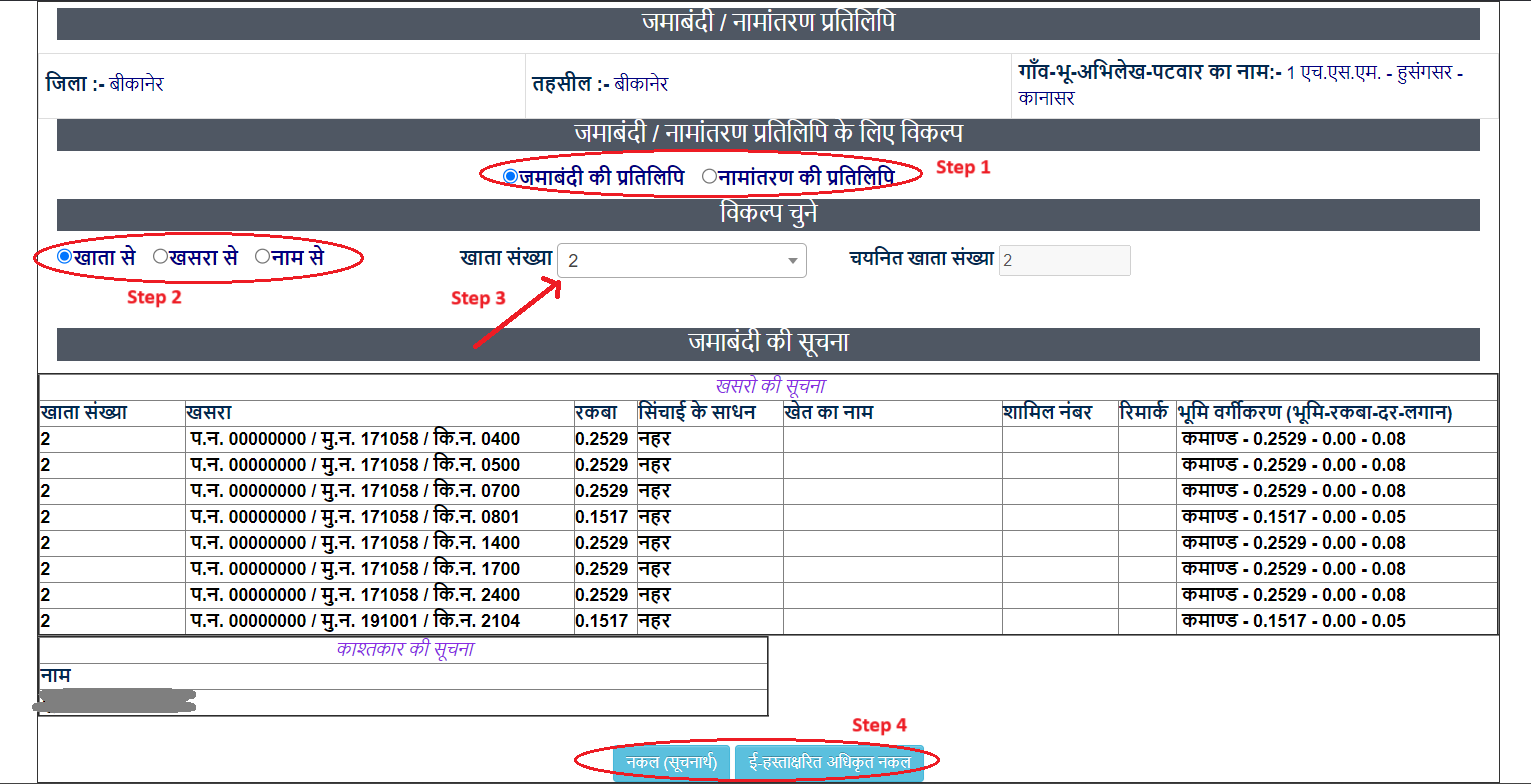
- View/Download: Click on 'Nakal' to view the Jamabandi. You can save it as a PDF for informational purposes.
How to Apply for Name Transfer (Mutation)
If you have bought land, inherited it, or need to update the owner's name, you must apply for Mutation (Namaantar).
- On the Apna Khata homepage, click on "Apply for Mutation" (नामांतरण के लिए आवेदन करें).
- Fill in the applicant's details (Name, Father's name, Address, Mobile).
- Select the Type of Mutation (e.g., Sale, Inheritance/Virasat, Gift, or Bank Loan).
- Upload the required documents (e.g., Sale Deed, Death Certificate for inheritance) in PDF format (usually under 150KB per page).
- Submit the form to receive a Token Number.
How to Check Transfer/Mutation Status
To see if your name transfer has been approved:
- Click on "Application Status" (आवेदन की वर्तमान स्थिति) on the homepage.
- Select your District.
- A list or search bar will allow you to see the status of mutations in your area using your Token Number.
Contact Details
| Department | Contact Number & Email |
|---|---|
| Revenue Board (Ajmer) |
0145-2627023 / 2627891 Email: bor-rj@nic.in / apnakhata-rj@gmail.com |
| Technical Support (NIC) |
0141-2233725 Email: lrc-rj@nic.in / arun.mathur@nic.in |
FAQs
1. Is the "Copy for Information" valid for a bank loan?
No. The free copy is only for your information. For bank loans, you must obtain an e-signed/certified copy from the portal or an e-Mitra center.
2. What is the difference between Khata and Khasra number?
A Khata Number is an account number for a family or owner (holding multiple plots), while a Khasra Number is a unique identification number for a single specific plot.
3. What should I do if my name is spelled wrong in the online record?
You should submit a "Shuddhipatra" (Correction) application at your local Tehsil office or apply for a correction through the portal if the option is active for your village.
4. How much does it cost to get an e-signed Jamabandi?
The fee is usually very nominal, around ₹10 to ₹20 per copy, depending on the number of Khasras.
5. Can I check old land records on Apna Khata?
Yes, the portal allows you to select the "Jamabandi Year" to view historical records of land ownership.